This week we have a collection of tools and articles that genuinely improve how we build software and manage our daily workflows. From automating pre-push checks to refining SQL formatting, these notes share practical wins for the modern .NET developer. Give them a read through before your next commit or sprint starts.
A faster, lighter C# Dev Kit - .NET Blog (Drew Noakes) - Understand better all the goodness in this upcoming new release of our beloved VS Code extension, C# Dev Kit
Volunteers Don't Quit. They Fade. (Henk Boelman) - Communities are so important; would it be in person or online. We really need to learn how to be better at keeping a healthy balance
I have a confession to make. For years, every time I had to write or edit a SQL INSERT statement, I did the same little dance: put my cursor on a value, count the commas, scroll back up to the column list, count again, and hope I landed on the right spot. Then I'd change the value... and still not be 100% sure it was the right column.
With three or four columns, fine. But give me a table with fifteen columns and a few rows of data, and I'm suddenly back in school, counting on my fingers.
So I built Rainbow SQL, my very first VS Code extension. 🎉
The idea: just give me matching colors
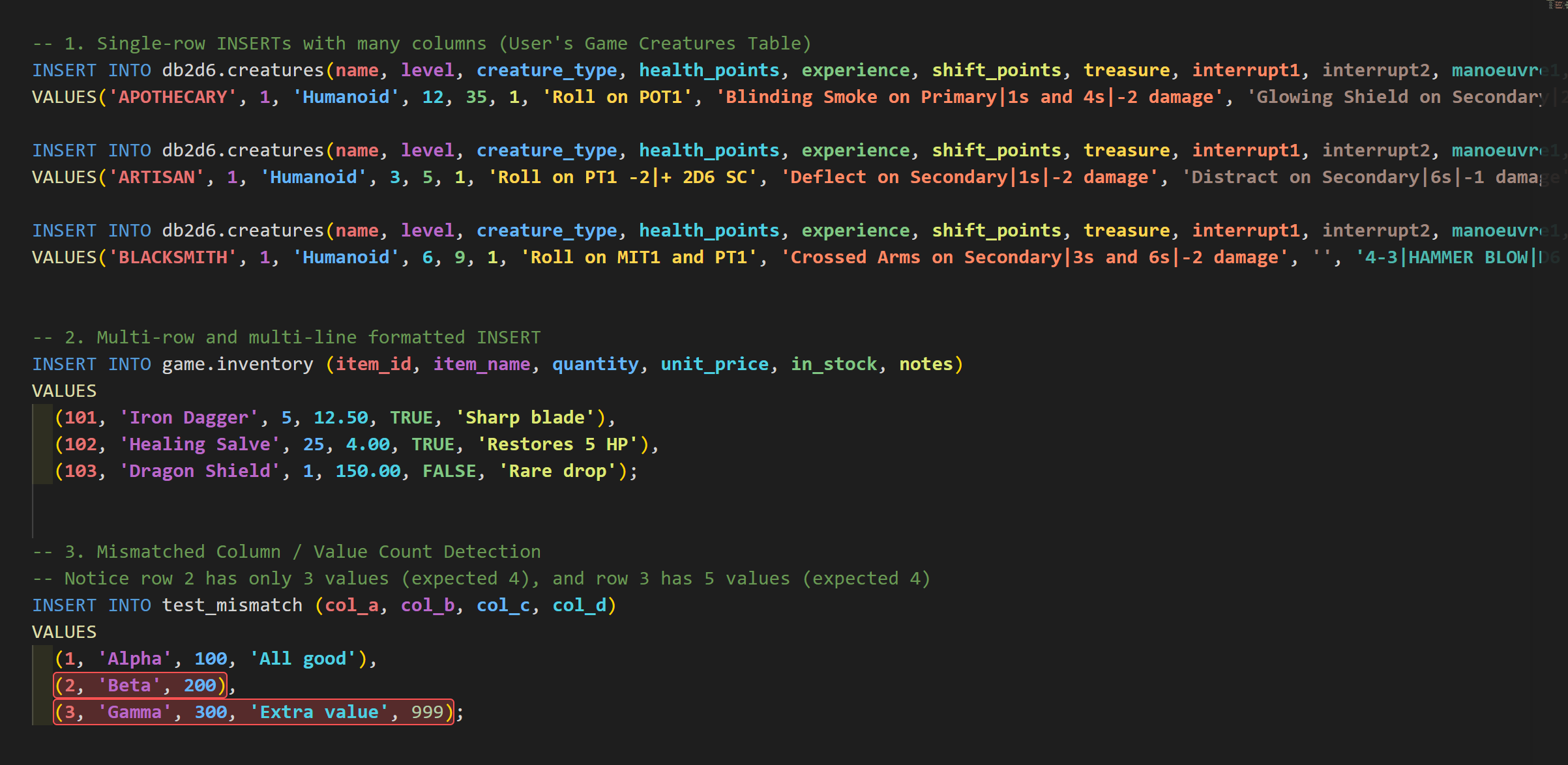
The idea was simple. If every column had its own color, and every value used the same color as its column, I wouldn't need to count anything anymore. I could just see it.
Here's what that looks like:
health_points is blue, so the blue value is the health points. That's it. No more counting commas.
It works whether your statement is on one long line, or nicely formatted across multiple lines with many rows:
Every id gets the same color, every code gets the same color, and so on, all the way down.
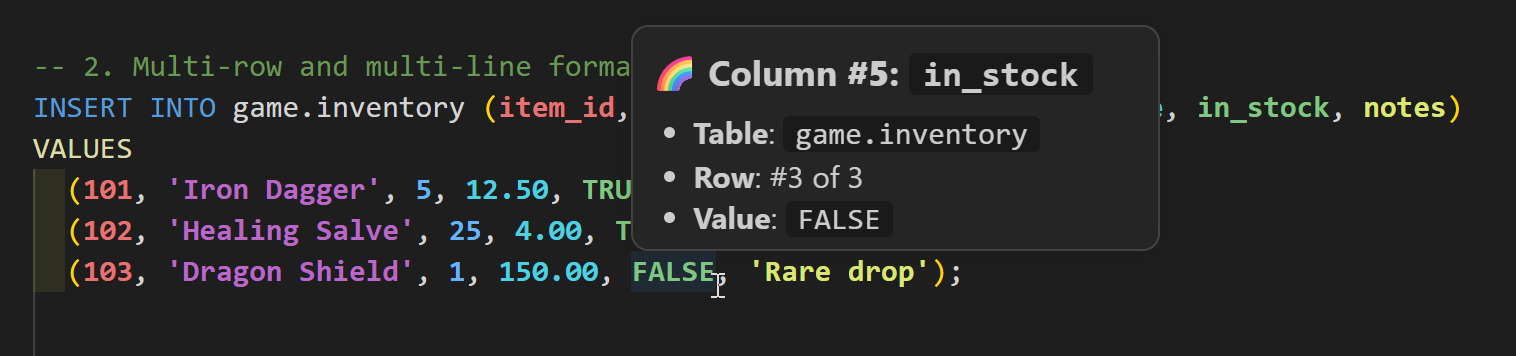
"But which column is this, exactly?"
Colors are great, but sometimes you want to be sure. So I added a little hover popup. Put your mouse over any value and Rainbow SQL tells you the column number, the column name, the table, and which row you're in.
And if you're more of a keyboard person (like me most of the time), the active column also shows up in the status bar while you move your cursor through the statement.
A small bonus: catching mismatches
While building it, I kept running into a second classic mistake: one value too many, or one value missing. You know, the kind of error that only shows up when you run the script... and of course it's on row 47.
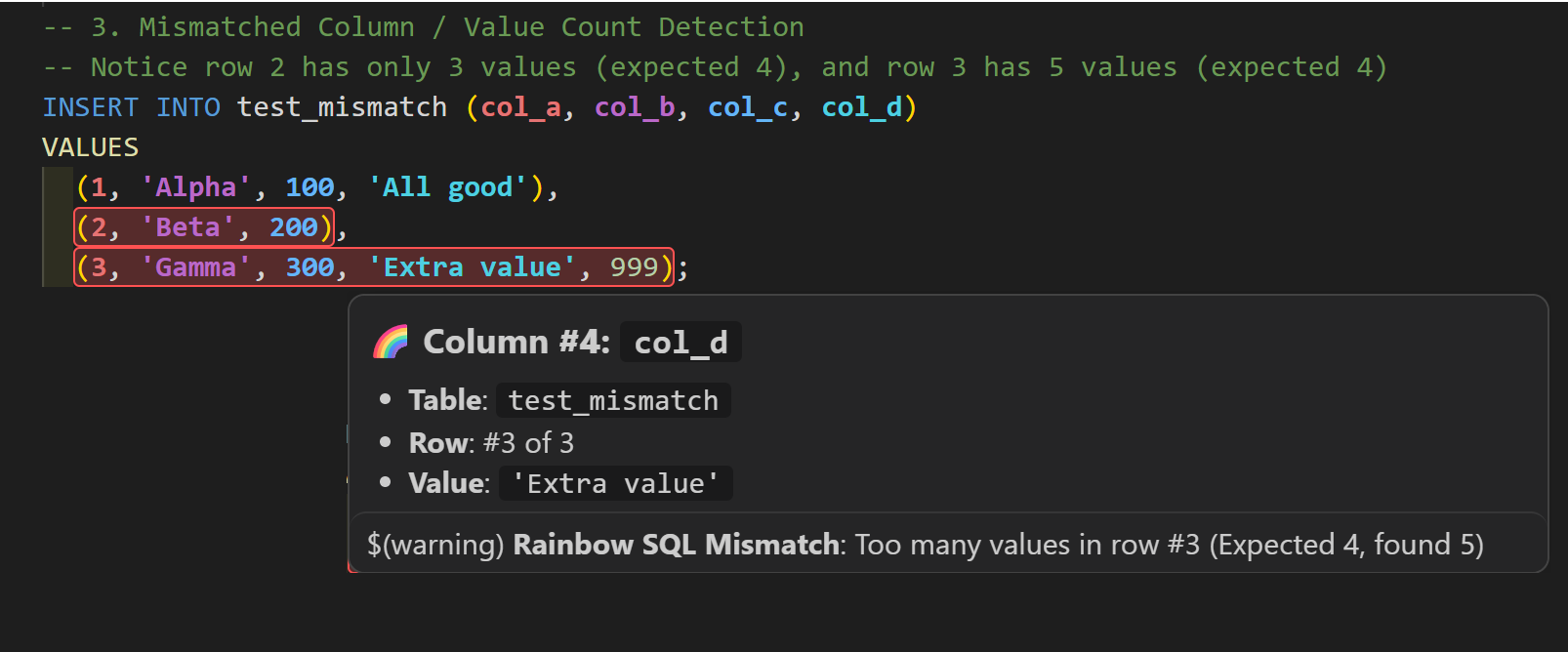
Let me be clear: Rainbow SQL is not a SQL validator, and it doesn't try to be one. But when the number of values in a row doesn't match the number of declared columns, it highlights that row in red so you can spot it right away.
Row 2 is missing a value, row 3 has an extra one. Both jump out immediately.
The rest of the goodies
Here's a quick tour of everything that's in there:
Matching column and value colors to follow each column through one or more VALUES rows.
Single-row and multi-row statements, on one line or across many.
Column details on hover: column number, name, table, and row position.
Active column in the status bar while you move through a statement.
Mismatch detection for rows with too many or too few values.
Theme-aware colors, with separate palettes for light and dark themes. And yes, you can customize them.
SQL-aware parsing that handles quoted values, comments, nested expressions, and the usual identifier quoting styles.
It activates for SQL, PostgreSQL, MySQL, PL/SQL, T-SQL, and SQLite files. And if you ever want a break from the rainbow, run Rainbow SQL: Toggle Rainbow SQL Highlighting from the Command Palette.
Give it a try (and tell me what you think!)
Rainbow SQL is free and available now on the Visual Studio Marketplace:
Or install it directly from VS Code: open the Extensions view (Ctrl+Shift+X), search for Rainbow SQL, and click Install.
If it saves you a few minutes of comma counting, I'd really appreciate it if you left a review on the Marketplace. It's my first extension, so every rating and comment means a lot, and it helps other people find it too.
Found a bug or have an idea? The code is on GitHub at fboucher/vscode-rainbow-sql, and issues are very welcome.
This week’s highlights bring together some practical programming improvements, thoughtful reflections on the craft of coding, and a few interesting ways to work with AI. From open-source Blazor controls and smarter CSS optimization to Claude Code routing, Docker Sandboxes, and better secrets management, there’s plenty here to explore and put to use.
Sharing my Reading Notes is a habit I started a long time ago, where I share a list of all the articles, blog posts, and books that catch my interest during the week.
When I stepped into a role with many APIs to ramp up on, I needed a faster way to explore endpoints, chain calls, and inspect responses without bouncing between tools.
The VS Code extension REST Client (humao.rest-client) helped me do exactly that. It lets you send REST and GraphQL requests directly from .http files in VS Code.
In this post, I will share the workflow I use to learn APIs quickly: keep requests close to code and notes, reuse values across calls, and avoid unnecessary copy-paste.
To start, create a .http file and add your requests there. Separate requests with ###; that separator is what makes the Send Request link appear above each request block.
Yes, you can use AI or tools like Postman and Insomnia to generate requests. But when your goal is to learn an API, it helps to keep everything close to your code and notes. I already had VS Code open all day, so I decided to keep my full API learning workflow there.
In my case, every API call is secured and requires an access token, so generating one is step zero.
I could paste one token at the top of the file, but that approach breaks quickly: tokens expire, and pasted values can accidentally be committed or pushed.
That is why I keep credentials in a local .env file (for example: CLIENT_ID, CLIENT_SECRET, and TENANT_ID) that is listed in .gitignore.
Then I created my first request to generate an access token from those values:
POST https://login.microsoftonline.com:443/{{$dotenv TENANT_ID}}/oauth2/v2.0/token
Content-Type: application/x-www-form-urlencoded

client_id={{$dotenv CLIENT_ID}}&scope={{$dotenv CREDS_SCOPES}}&client_secret={{$dotenv CLIENT_SECRET}}&grant_type=client_credentials
Quick breakdown: each {{$dotenv ...}} expression reads a value from your .env file, so you keep secrets out of your .http file and out of source control.
{{$dotenv TENANT_ID}} -> TENANT_ID
{{$dotenv CLIENT_ID}} -> CLIENT_ID
{{$dotenv CLIENT_SECRET}} -> CLIENT_SECRET
To execute the call, click the Send Request link above the request. The response opens in a new tab, and you can inspect the access token in the body.
Then you can use that token in the next request:
GET https://ecostruxure-building-platform-api-uat.se.app/api/Sites
Authorization: Bearer {{ACCESS_TOKEN}}
X-Api-Version: {{apiVersion}}
To avoid copy-pasting values, the better approach is to name requests and reference their responses as variables:
Notice the @name createToken labels that request. After it runs, you can access fields from its response body. The response content is JSON and looks like this:
For example, to retrieve the access_token value, we can use the expression createToken.response.body.$.access_token. When assigned to a variable, it looks like this:
Then you can use {{ACCESS_TOKEN}} in all your requests, like this one that retrieves all buildings:
### ==============================
#### Retrieve my sites
# @name getBuildings

GET https://ecostruxure-building-platform-api-uat.se.app/api/Buildings
Authorization: Bearer {{ACCESS_TOKEN}}
X-Api-Version: {{apiVersion}}
If you come back later and the token has expired, just run the token request again, and the variable {{ACCESS_TOKEN}} will automatically update for all subsequent requests. No copy-pasting required.
Extracting a value from a list response
What if a response returns multiple items and you need one specific ID?
For example, the previous query returns multiple buildings, but I was interested in the building named "Virtual Building FB". The response looks like this:
To get the value of the id property for one building with a specific name, we can filter with JSONPath:
@buildingId={{getBuildings.response.body.$[?(@.name=='Virtual Building FB')].id}}
This uses the previous request response (getBuildings) and extracts the matching id.
ℹ️ NOTE: If this is your first time seeing JSONPath, read it like this:
$ means "start from the root of the response body."
[?()] applies a filter.
@.name=='Virtual Building FB' keeps only objects where name matches.
.id returns the id field from the matched object.
Then use {{buildingId}} in the next request:
### ==============================
### Retrieve all floors within a specific building
# @name getFloors

GET https://ecostruxure-building-platform-api-uat.se.app/api/Buildings/{{buildingId}}/Floors
Authorization: Bearer {{ACCESS_TOKEN}}
X-Api-Version: {{apiVersion}}
GraphQL is powerful here because you can request related data in one call instead of chaining multiple REST endpoints.
In short: if you are learning a new API, REST Client helps you move faster with less context switching. Keep your requests in a .http file, reuse values with @name + {{...}}, and iterate directly in VS Code.
Lately, this workflow has been even more useful as my day-to-day work includes broader platform discussions and faster discovery cycles.
If useful, I can share a follow-up .http starter template that you can adapt to your own APIs.
Show Me
You prefer watching a video? I got you here a video I did sharing the how I use REST Client extension.
This week’s collection explores the practical side of AI, focusing on governance in multi-model environments and the security advantages of robust sandboxing. I’ve also included some foundational perspectives on and organizational goals, along with a look into the history of one of my favorite tools, VS Code.
AI
James Shore: Are You Getting Your Money’s Worth from AI? (James Shore) - Interesting first post of a series. This one focuses on what we should or shouldn't measure to see and understand the performance of our teams using AI.
6 Benefits of Sandbox Environments (Kevin Wittek, Srini Sekaran) - I really like how this post explains the security issues, how Docker sandboxes address the weaknesses, and how its sandboxes differ from others.
That book has been on my to-read list for a very long time. As someone who worked at Microsoft using many OKRs, I was comfortable with the topic. Nevertheless, it was interesting to learn how other people use it in many different contexts.
This week’s collection features a mix of critical .NET lifecycle updates and practical strategies for optimizing your database interactions. These selected articles offer helpful insights into everything from edge computing deployments to the evolving landscape of AI in modern workflows.
AI
AI Raised the Bar (And Now We're All Tired) (Golnaz) - It's so true! So much can be done quickly today. An interesting question is: how do we avoid burning out resources and tokens? How, as human we stay smart? After all, life is a marathon, not a sprint!
EF Core vs Dapper in .NET: When to Use Each (Nick Cosentino) - Great post for developers or architects planning a future project. Both tools are great, so the decision factor depends on the context.
This week's collection highlights the rapid evolution of AI agents, exploring their asynchronous capabilities, deployment journeys, and their impact on DevOps and video editing. On the programming front, we explore new Git features and API versioning with OpenAPI in .NET 10. We also dive into some fascinating podcast discussions ranging from the GUI vs. CLI debate to generational perspectives in the workplace.
510: AI Agents: Claws, Copilot, GUI vs CLI Debate (Merge Conflict) - In this episode, James is put in the spotlight and needs to talk about this phone situation. Honestly, interesting discussion and they finally end up talking about the AI agent, you know, CLI versus UI.
Can AI Agents Safely Become DevOps Engineers? (Agentic DevOps : AI + Infra Ops) - I read and consume a lot of AI as a developer, it's interesting to see the DevOps side waking up and are building AI agents that focus on DevOps.
Chet Husk: .NET Tooling - Episode 399 (AI DevOps Podcast) - I never thought about that competition, the human versus the machine, related to the consumption of the output of a CLI. This was a very interesting episode about the performance and the priorities.
AI keeps changing how we build, think, and even feel about software. This batch of posts & episodes mixes practical agent skills, vibe coding, and faster shipping with a bit of reflection on the old internet and why it still sticks with us.
AI
5 Agent Skills I Use Every Day (Matt Pocock) - This post shares really useful and impactful skills and explains how they work.
9 Ways AI Coding Has Rewired My Brain (Matt Pocock) - An interesting post that not only describes an efficient way to code with AI but also to stay relevant.
Podcasts
Your Images are Out of Date (probably) - The Silent Rebuilds problem (DevOps and Docker Talk: Cloud Native Interviews and Tooling) - Very interesting episode. I guess I never realized how true it is that as soon as you download your image, they are outdated. This episode talks about the concept of silent rebuilds and tools to help us solve that issue.
503: Welcome to Tiny Tool Town (Merge Conflict) - With a name like Tiny Tool Town, my head always goes to Looney Tunes. No idea why, but this episode is not about that. It's about the collection of open source tools named: Tiny Tool Town, and they also talk about different models in GitHub Copilot.
Building Software using Squad with Brady Gaster (.NET Rocks!) - Turn your Coplot to 11 with Squad. Carl and Richard talk to Brady Gaster about Squad, a tool for creating an AI development team using GitHub Copilot.
Daniel Ward: AI Agents - Episode 393 (Azure & DevOps Podcast) - In this episode, they talk about the different AI tools used by developers and DevOps people, and the trends.
Everything Is a Graph (Even Your Dad Jokes) with Roi Lipman (Screaming in the Cloud) - Nice episode about different database and most obviously about graph databases. Very interesting to learn more about all that explosion of database types.
Miscellaneous
Kill Your Ego, Ship Your Work (Golnaz) - Great advice from Golnaz in this post. This is why so many people want to work with her.
Sharing my Reading Notes is a habit I started a long time ago, where I share a list of all the articles, blog posts, podcasts and books that catch my interest during the week.
From debugging Docker builds to refining your .NET setup, this week’s Reading Notes delivers a sharp mix of practical dev tips and forward-looking tech insights. We revisit jQuery’s place in today’s web stack, explore AI-enhancing MCP servers, and spotlight open-source projects shaping tomorrow’s tools. Plus, PowerToys gets a sleek upgrade to streamline your Windows workflow.
Let’s check out the ideas and updates that keep your skills fresh and your systems humming.
Programming
A quick look at Dev Tunnels (Mike Irving) - This post shares a very cool feature where you can make your local Host available to someone else to reproduce a bug or try an API without having to deploy. Pretty cool,
6 Steps for Setting Up a New .NET Project the Right Way (Milan Jovanović) - This nice post provides some simple best practices. It helps to keep the code consistent and efficient when the solution contains multiple projects or when multiple developers are involved.
Sharing my Reading Notes is a habit I started a long time ago, where I share a list of all the articles, blog posts, and books that catch my interest during the week.
This week's reading notes cover a variety of insightful topics, from enhancing your development environment with dev containers on Windows to prioritizing open-source bugs effectively. You'll also find helpful posts on integrating MFA into your login process, exploring RavenDB's vector search capabilities, and understanding the differences between Ask Mode and Agent Mode in Visual Studio.
Why You Should Incorporate MFA into Your Login Process (Suzanne Scacca) - You think the answer is simple, think again. Nice post that explains the difference between 2FA and MFA and why you should or should not implement one of those
Aspire Dashboard (Joseph Guadagno) - Great deep dive about the Aspire dashboard, learn all the features packed inside it
Open Source
How I Prioritize OSS Bugs (jeremydmiller) - A very instructive post on a real-life issue. It's harder than people think to prioritize. And it may help you write better bug reports...
MCP server integration in Visual Studio (Mark Downie) - Great update! That security stuff is very important and a good example using get up to store your tokens love it
Sharing my Reading Notes is a habit I started a long time ago, where I share a list of all the articles, blog posts, and books that catch my interest during the week.
This week's collection of interesting articles and resources covers AI development, DevOps practices, and open source tools. From GitHub Copilot customization to local AI deployments and containerization best practices, here are the highlights worth your attention.
Top 5 MCP Server Best Practices (Ivan Pedrazas) - mCP server is a very hot topic, thinking about riding your own, here are five best practices to make sure you will be successful.
Containerize Your Apps with Ask Gordon (Steve Buchanan) - I already have Docker desktop on my Windows pc, I should definitely give Gordon a try more to come
DevOps
Local Deploy with Bicep (Sam Cogan) - A perfect short story, I'll explain why the hell bicep can now deploy locally and how to do it
Open Source
Introducing OpenCLI (Patrik Svensson) - A standard that describes CLI so both humans and agents can understand how it works. Love it!
Welcome to another edition of my reading notes! This week, I’ve gathered a selection of insightful articles and resources covering topics like AI, cloud security, open source, and developer productivity. Whether you’re interested in best practices, new tools, or thought-provoking perspectives, there’s something here for everyone.
Dive in and enjoy the highlights!
Suggestion of the week
Copilot, The Good Parts: Efficiency (Rob Conery) - I love that post, it's so true! There are good and bad ways to use any tools. And I personally would really like seeing Rob build his stuff. Let's him know If you think like me.
Fantastic Alert Messages Using SweetAlert (Héctor Pérez ) - A great component to manage our alerts in C# instead of having JavaScript. That makes code easier to test when all is in the same language.
You DON’T Need Microservices for Serverless! (Derek Comartin) - A great post that explained the difference between cold coupling and monolithics versus microservices great post.
Open Source
How to convince your boss to sponsor Open Web Docs (Patrick Brosset) - Open source is important! And to contribute, it doesn't have to be code. Nice post that shares ideas and explains a few things about OSS.
Local code review with Docker and smollm2 before pushing to git (Gerardo Lopez) - This is a great idea! Definitely a good way to avoid the light of shame and be able to quickly validate that your code looks okay. It's also a great way to experiment free hook.
Welcome to Reading Notes #653 another packed edition of insights, tools, and updates from the tech world! This week's roundup dives into legendary engineering wisdom, AI controversies, and the latest innovations in Docker, Azure, and VS Code. Whether you're exploring MCP, refining your scripting skills, or gearing up for the newest Azure Developer CLI release, there's something here for every developer.
Let’s get into it!
Cloud
Azure Developer CLI (azd) - June 2025 (Kristen Womack) - Love that tool, great updates, so many new features and improvements in this version, very looking forward to try all of them, turning them all
AI
Publishing AI models to Docker Hub (Kevin Wittek) - Running model locally is a lot of people are looking forward to it, so this is good news can't wait to try it
Welcome to another edition of my reading notes! This week brings some fascinating insights into AI's real-world impact, exciting developments in .NET and containerization, plus practical tools for improving our development workflows.
From local AI-powered code reviews to Docker security hardening and the upcoming .NET 10 features, there's plenty to explore.
AI
The promise that wasn’t kept (Salma Alam Maylor) - Interesting thoughts about AI and its impact on our work but also on our life, and the planet.
Inside GitHub: How we hardened our SAML implementation (Greg Ose, Taylor Reis) - Very interesting post that pushes the curtain a little bit so we could see behind the scene how this very used but notification system works and has been updated
Enhance productivity with AI + Remote Dev (Brigit Murtaugh, Christof Marti, Josh Spicer, Olivia Guzzardo McVicker) - I love the dev container environments, they are so useful! And I also use the remote one when I'm not on my dev device so easy. Happy to see that Copilot will be right there with me.
It's time for another edition of Reading Notes! This week brings exciting developments in the open source world, with major announcements from Microsoft making WSL and VS Code's AI features open source. We've also got updates on Azure Container Apps, .NET Aspire, and some great insights on developer productivity tools.
Let's dive into these interesting reads that caught my attention this week.
Cloud
Happy 5th Birthday Bicep! (Sam Cogan) - What?! Five years already! That's incredible, I remember all the discussion about how we make our business better and honestly, bicep is a big success. Congrats to the team
Have I Been Pwned 2.0 is Now Live! (Troy Hunt) - New look, new merch, and confetti, all without API breaking changes! Learn all about this major update in this post.
What's new in .NET Aspire 9.3 (David Pine) - Wow! How so many great new features can be added in a single version?! Aspire is a must for all .NET developers.
Accelerate Your .NET Upgrades with GitHub Copilot (McKenna Barlow) - That's the tool I've been waiting for ages! Adding a Copilot to the extension is the smartest move they could make. I'm going to update an app right away. I'll share more later
Open Source
Edit is now open source (Christopher Nguyen) - That's a great news! I installed it half through the post and it great! Fast, simple, and tiny!! Love it!
Agent mode for every developer (Katie Savage) - Great new for everyone as the agent mode become available in so many different editor. This post also contains videos to shows some scenarios.
Podcasts
Reimagining the Windows Terminal with Warp's Zach Lloyd (Scott Hanselman) - A very interesting talk with the CEO of Warp that answers so many questions I had about this very different terminal. Really interesting episode, and terminal too BTW)
The experience is enough (Salma Alam-Naylor) - Whether we like it or not, we are people creature. We all need to stop hiding behind our screens and get out there!
This post is a collection of my latest reading notes, highlighting interesting articles and resources on AI, programming, databases, and more. Each link includes a brief summary of what I found valuable or noteworthy.
Help yourself to thrive (Salma) - The human body is an extraordinary machine, extremely strong and conciliant, but it also requires a fine turning. Great post, we must learn from it.
Sharing my Reading Notes is a habit I started a long time ago, where I share a list of all the articles, blog posts, and books that catch my interest during the week.
Welcome to this week's collection of fascinating reads across cloud computing, AI, and programming! As technology continues to evolve at breakneck speed, I've gathered some of the most insightful articles that caught my attention. From securing MCP servers to exploring Rust, there's something here for every tech enthusiast.
Dive in and discover what's new in our rapidly changing digital landscape.
When ASP.NET Core Identity Is No Longer Enough (Andrea Chiarelli) - Authentication and authorization have an important place in our Apps. This post shares details about how things work and the different processes.
New Docker Extension for Visual Studio Code (Remy Suen) - This extension was already a must, they made it better, it's a must must! But seriously give it a try and try it by yourself.
Sharing my Reading Notes is a habit I started a long time ago, where I share a list of all the articles, blog posts, and books that catch my interest during the week.
This post gathers my recent reading notes on artificial intelligence, programming, and a few inspiring podcasts. It includes links to articles, tutorials, and fascinating discussions. Whether you're interested in the latest AI developments, .NET tools, or modern architectures, there's plenty here to spark your curiosity.
Vertical Slice Architecture with Jeremy Miller (.NET Rocks!) - This episode is about Vertical Slice Architecture, what it is, when it makes sense to use it, and some comparisons with the others that we know.
Sharing my Reading Notes is a habit I started a long time ago, where I share a list of all the articles, blog posts, and books that catch my interest during the week.
This week, I explored posts about improving cache management for ASP.NET Core applications and understanding error handling in Blazor. These articles, along with others on AI model selection and development productivity, offer valuable insights for developers.
Selecting the right model for coding (Mark Downie) - Nice post that answers a question, that I'm sure many of us thought without really knowing the answer.
Miscellaneous
Announcing Dapr AI Agents (Mark Fussell, Yaron Schneider, Roberto Rodriguez) - I like those tech savvy agent that knows about one thing. I f|l I can trust them more and it usually go faster.
Sharing my Reading Notes is a habit I started a long time ago, where I share a list of all the articles, blog posts, and books that catch my interest during the week.
This week's reading notes cover an array of topics, from programming insights and AI advancements to cloud solutions and practical tips for developers. Explore the updates, tools, and advice that could inspire your next project!
prompt: Web dev in a D&D monsters card style
Suggestion of the week
Profiles in Visual Studio Code - I used two profiles to control an extension. But after reading this, I may create more! I have so many ideas.
Sharing my Reading Notes is a habit I started a long time ago, where I share a list of all the articles, blog posts, and books that catch my interest during the week.





-EDIT.jpg)


